UC-6.2 — Biological Interaction Flow
Module: 6 – Hierarchical and Flow-based Functional Analysis
Visualization type: Three-stage alluvial / Sankey diagram
Primary inputs: BioRemPP results table with sample, compoundclass, and enzyme_activity
Primary outputs: Multi-stage flow network from samples → compound classes → enzyme activities
Scientific Question and Rationale
Question: How are sample co-annotations distributed across different chemical classes, and which enzymatic activities are most frequently co-annotated with each?
This use case characterizes the co-annotation distribution of the biological samples by tracing how their annotations are distributed across chemical classes and enzyme activities. By organizing the information into a three-stage alluvial diagram, the analysis can reveal which compound classes are most frequently co-annotated with each sample and which enzymatic functions appear most often in those co-annotation contexts. The thickness of each flow encodes how frequently a given combination occurs, providing a quantitative view of broad vs. narrow annotation profiles and enzyme annotation breadth within the dataset.
Data and Inputs
- Primary data source:
BioRemPP_Results.xlsx or BioRemPP_Results.csv - Key columns:
sample– identifier for each biological samplecompoundclass– chemical class/category of the compoundenzyme_activity– functional label for the enzymatic activity (e.g., monooxygenase, dehydrogenase)-
Accepted format: semicolon-delimited text table (
.txtor.csv) -
Conceptual flow (stages):
- Sample (
sample) - Compound Class (
compoundclass) - Enzyme Activity (
enzyme_activity)
Analytical Workflow
-
Data Loading
The primary results table (BioRemPP_Results.xlsx or BioRemPP_Results.csv) is loaded from its semicolon-delimited format. -
Path Definition
A three-stage path is defined for each row using: -
sample→compoundclass→enzyme_activity.
Each complete combination represents a co-annotation flow from a given sample, through a chemical class, to a specific enzymatic function. -
Aggregation of Flows
The data is grouped by each unique three-step path: - for every unique
(sample, compoundclass, enzyme_activity)combination, -
the number of occurrences is counted.
This count becomes the flow value that determines ribbon thickness. -
Link Construction for Sankey / Alluvial Diagram
The aggregated paths are transformed into a set of linked pairs suitable for a Sankey diagram: - Stage 1 → Stage 2:
sample→compoundclass -
Stage 2 → Stage 3:
compoundclass→enzyme_activity
Node indices and link values are encoded in the input format required by the plotting library. -
Rendering
The data is rendered as an interactive alluvial (Sankey) diagram: - three vertical columns represent the stages,
- nodes within each column represent unique entities (samples, compound classes, enzyme activities),
- ribbons connecting them represent flows weighted by their aggregated counts.
How to Read the Plot
- Vertical Columns (Stages)
From left to right, the columns represent: - Sample
- Compound Class
-
Enzyme Activity
-
Nodes within Columns
Each node is a unique entity at that stage: -
a specific sample, a specific compound class, or a specific enzyme activity.
Node size (height) is proportional to the total flow entering or leaving that node. -
Flows (Ribbons)
The ribbons connecting nodes represent interaction flows: - a ribbon from a sample to a compound class shows how strongly that sample is associated with that class,
-
a ribbon from a compound class to an enzyme activity shows how strongly that class is linked to that enzymatic function.
-
Flow Thickness The thickness of each ribbon is proportional to the number of co-occurrences of that specific path in the data:
-
thicker ribbons may indicate more frequently observed co-annotation combinations.
-
Interactivity
In the interactive version: - hovering over nodes or flows reveals labels and numeric values (counts),
- nodes can be dragged vertically to reduce overlap and improve readability.
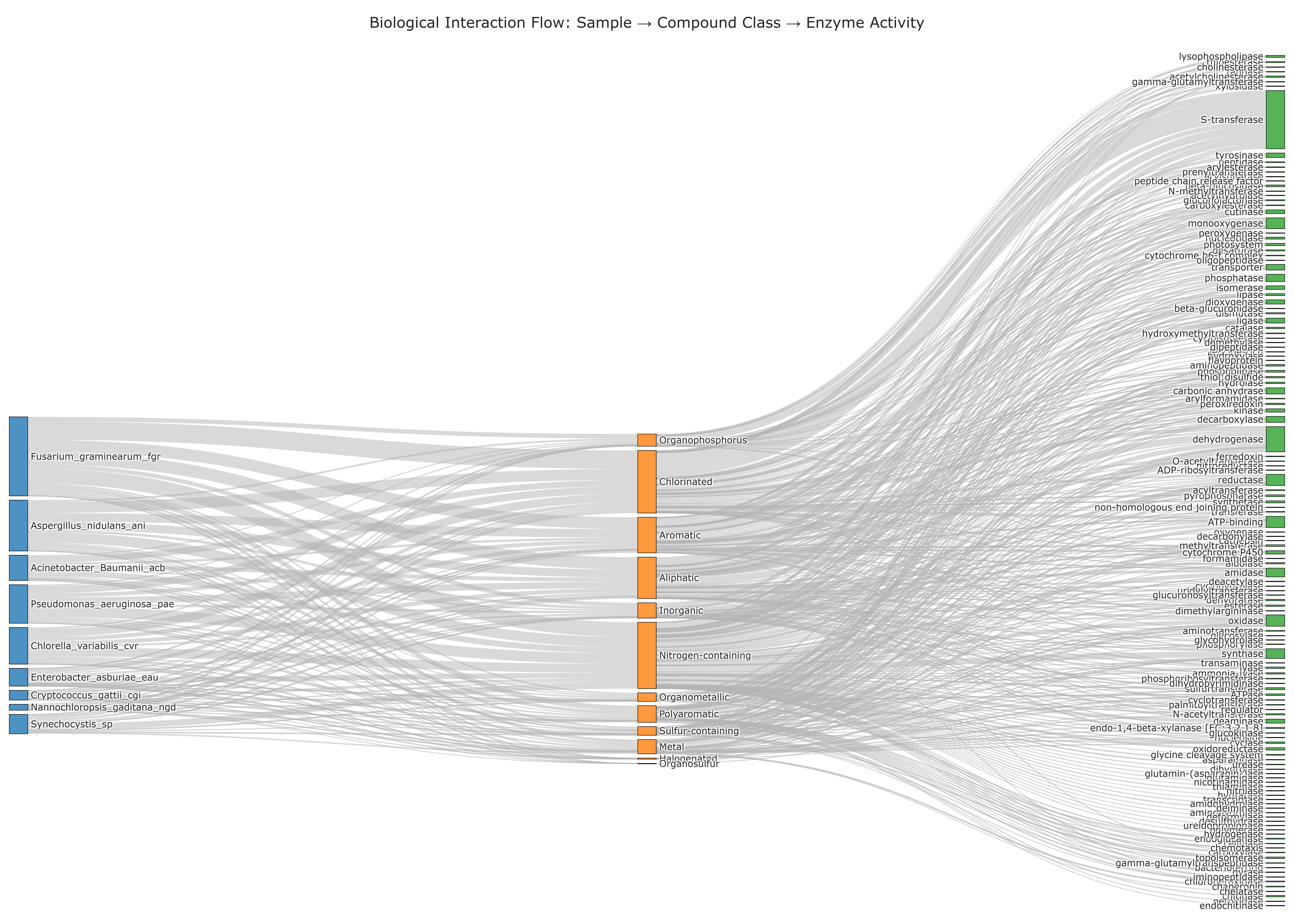
Representative Output
The image below illustrates a representative output generated by this use case using the example dataset.
Click on the image to enlarge and explore details.
Interpretation and Key Messages
- Dominant Co-annotation Patterns per Sample The thickest flows emerging from a given sample may highlight its primary co-annotation patterns:
-
for example, a strong flow from a sample to an aromatic compound class and then to a monooxygenase activity may suggest that these annotations co-occur frequently in that sample's data.
-
Broad vs. Narrow Annotation Profiles
- A sample dominated by a few very thick flows (one or two classes and enzyme activities) shows narrower co-annotation coverage concentrated in specific categories.
-
A sample whose flows branch out across many compound classes and enzyme activities shows broader co-annotation coverage across diverse chemical and enzymatic categories.
-
Broadly Co-annotated Enzyme Activities
- Enzyme activity nodes that receive flows from many different compound classes, or from many samples, may indicate broadly co-annotated enzymatic functions—appearing across diverse annotation contexts.
-
These broadly annotated activities may be candidates for deeper mechanistic investigation.
-
Chemical Class Co-annotation Profiles The intermediate column for compound classes may reveal:
- which classes are most frequently co-annotated in the dataset,
- and which enzymatic activities are most often co-annotated with each class.
Reproducibility and Assumptions
- Input Format
The analysis assumes a semicolon-delimited table containing at least the columns: -
sample,compoundclass, andenzyme_activity. -
Flow Definition
- Each unique
(sample, compoundclass, enzyme_activity)combination contributes a unit count to the corresponding path. -
The strength of a flow is defined as the total count of co-occurrences for that path in the raw data.
-
Scope and Limitations
- The alluvial diagram encodes frequency of observed co-annotation combinations, not reaction rates, kinetic efficiencies, or thermodynamic feasibility.
- It should be interpreted as a structural and comparative overview of which annotation paths are most frequently represented, and not as a direct measure of in situ activity or performance.
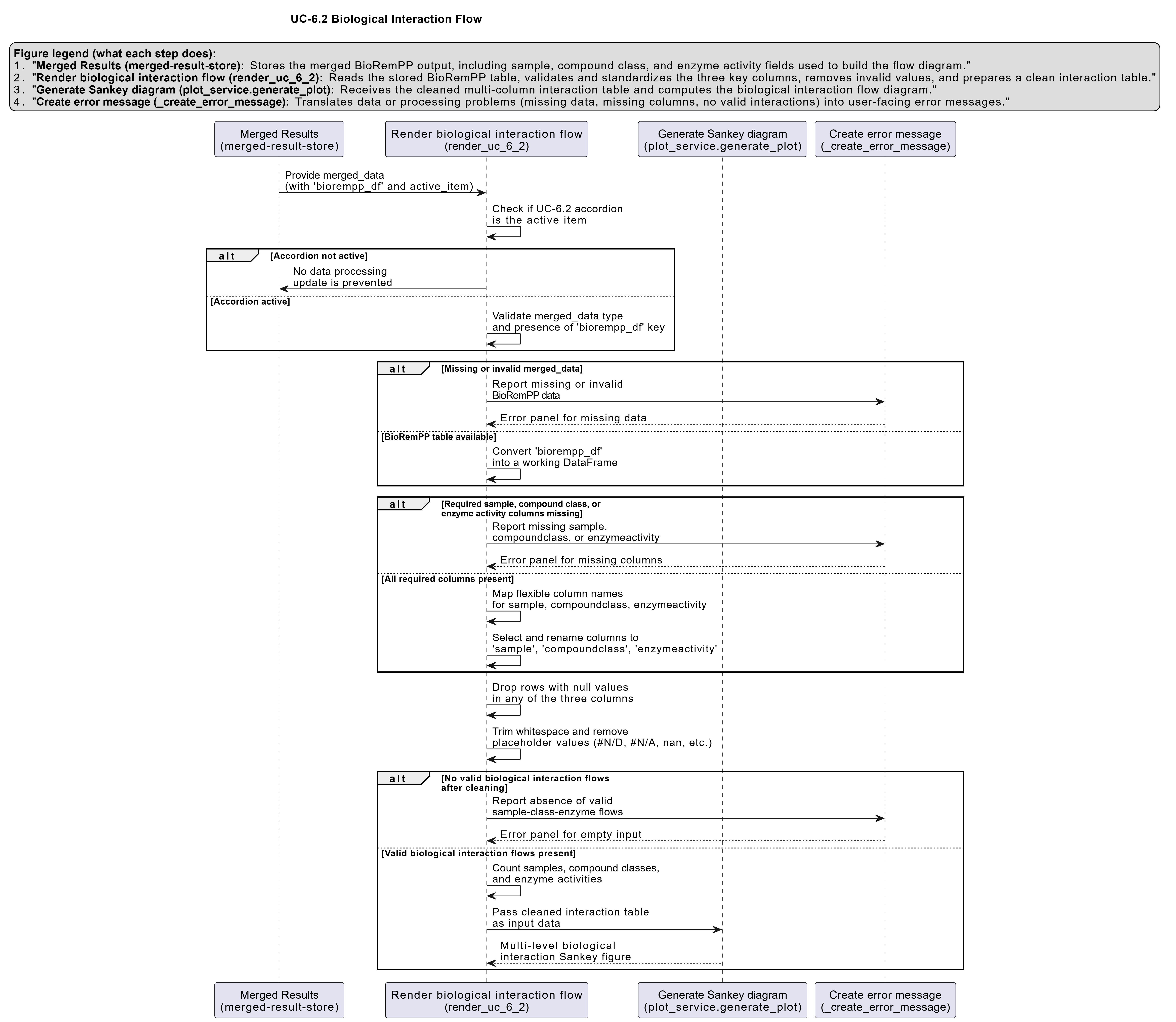
Activity diagram of the use case
Click on the image to enlarge and explore details.